Risk Register
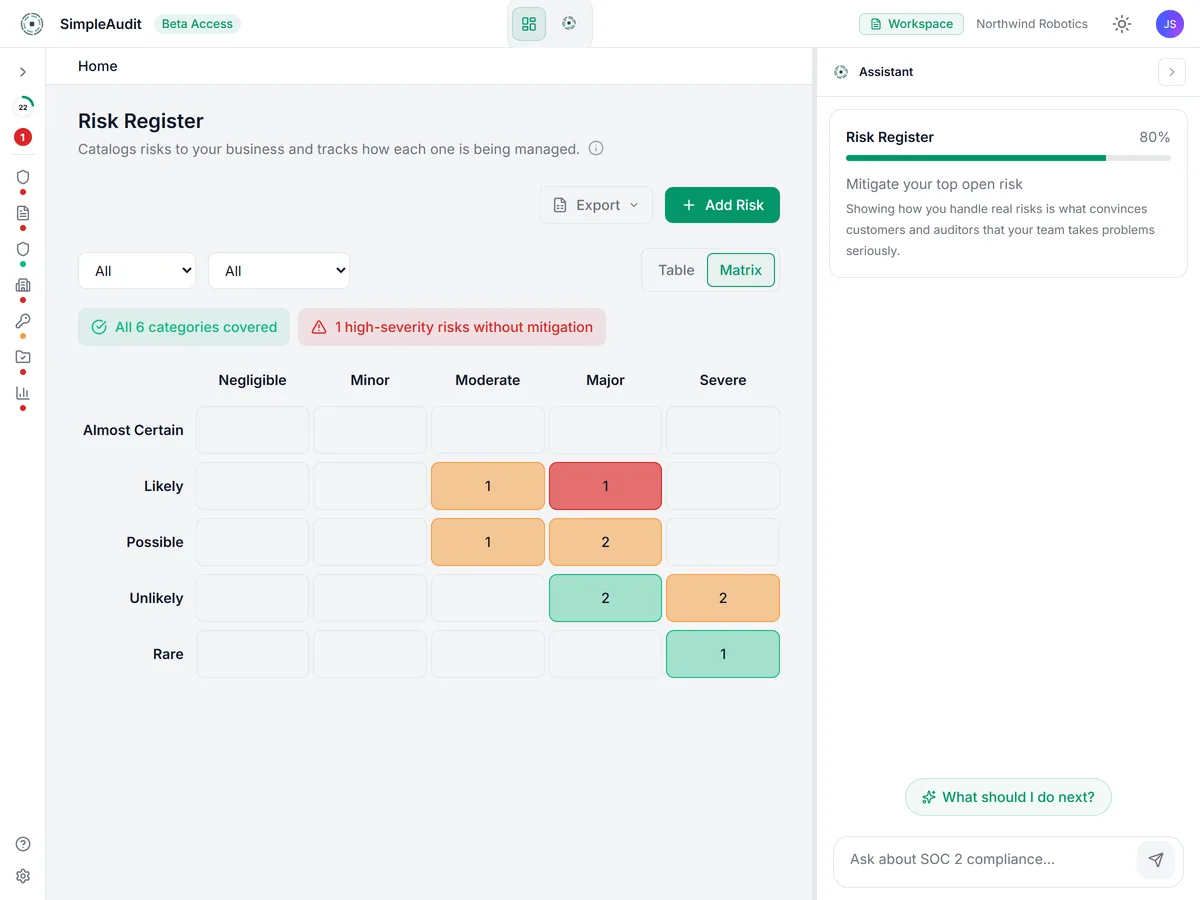
Identify risks with AI suggestions based on your company profile, rate each one before and after your controls (inherent and residual risk), record what you decided to do about it, and get the sign-off an auditor looks for. Built after a CPA SOC 2 auditor reviewed the register and asked for standard risk-assessment terms, so one export is set up to answer the risk assessment criteria (CC3.1 to CC3.4) and the risk mitigation criterion (CC9.1) without a conversation.
Updated
How it works
Get AI risk suggestions
Based on your company profile and industry, the AI suggests risks you should be tracking. Accept the ones that apply. They arrive as Identified, rated before controls only, until a person assesses them.
Rate, decide and link controls
Rate each risk before controls, choose a response (accept, avoid, reduce or share), link the controls that address it, and rate it again after controls. "Suggest answers" puts a draft beside each field to use or dismiss.
Sign off and export
Record the annual assessment, get management's approval, and export the workbook for your auditor. The signed-off copy is locked, and its ratings and decisions can be reproduced as of that date.
Key capabilities
AI Risk Identification
The AI suggests relevant risks from your company profile, so you never start from a blank spreadsheet. When something material changes, such as a new vendor, a profile update or a newly approved policy, it offers to check the register again and proposes new risks, rating changes, and risks that may be obsolete. You accept or reject each line. Rejected suggestions are remembered with your reason and come back only when the AI can say what changed.
Risk Before and After Controls
Rate every risk twice on the same 1 to 5 scales: before controls (inherent risk) and after controls (residual risk). The after rating can never be higher than the before rating. The scales and the Low, Medium and High bands are published on a methodology page your auditor can read.
A Recorded Response
Record what you decided to do about each risk (accept, avoid, reduce or share) and why. "Suggest answers" puts a draft beside each field: the response and why, the policies that cover it, other things that reduce it, to-dos, and where the risk lands afterward. You pick Use on the ones you agree with and save. The AI never decides a response or a rating after controls for you.
Risk Tolerance and Approval
Set once, for the whole company, how much risk you are willing to live with (risk tolerance). A risk above that line cannot be accepted until an Admin approves it, and the register records who approved it and when.
Risks Linked to Controls
Link each risk to the controls that address it and see the latest result of SimpleAudit's policy-versus-proof check for each one, where it has been run. A risk is flagged when a control behind its after-controls rating is failing, and the export includes a risk-to-control matrix showing your coverage.
Fraud and Change Triggers
Answer the fraud question for every risk (fraud risk), and record why you looked again: the annual review, a significant change, an incident, or a new vendor or system. Your auditor sees the register was revisited when things changed, not only on the calendar.
Signed-Off Annual Assessment
Record the annual assessment as a point-in-time copy of every open risk, with who performed it and who in management approved it. Once approved it is locked. A correction becomes a new assessment, and the register shows when the next one is due.
Auditor Workbook
Export one Excel workbook with six sheets: Register, Methodology, Risk Matrix, Risk-to-control matrix, Assessment history and Change log. Run it as of any approved assessment to reproduce the ratings and decisions as of that date. Your audit package includes the workbook plus an as-of copy for each approved assessment.
Why we built it this way
“Risk assessments are where most startups get stuck. You know you have risks, but staring at an empty spreadsheet is overwhelming. We built the Risk Register so the AI gives you a starting point based on your actual business, then you refine from there.”
Joe, Founder
Related Resources
Ready to try Risk Register?
Start your free trial and begin your SOC 2 journey with AI-powered compliance.